ZUnroll
Creates a pair of surfaces with the same parametrization: one follows the original surface in 3D, and the other is a flat (unrolled) version on the XY plane. Use the pair to deform objects from one surface to the other with ZFlowPlus.
Toolbar button: 
When to use
You have an open surface or polysurface and want to flatten objects, or wrap them, onto it with ZFlowPlus. You get two surfaces, an orange one (3D) and a pink one (flat 2D), ready to use as the base surface and the target surface.
Before you start
- Base curve (required): a curve on the XY plane, open or closed. An open curve creates an open surface and a closed curve creates a closed surface. A curve that is almost closed is rejected: close it first.
- Surface or polysurface (required): it must be open. Solids and closed polysurfaces are rejected.
- Reference curve (optional): also on the XY plane. It controls how the lines formed by the V points are aligned in the flat surface: they are made perpendicular to the reference curve. Without a reference curve, they are perpendicular to the base curve. Use a reference curve when the base curve is not a good guide for the direction of the sections.
- The surface must be "visible from above": each section, projected in Z, must touch the surface.
Steps
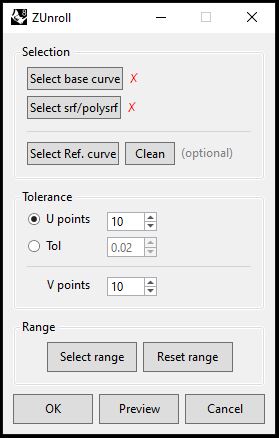
- Run
ZUnroll. A floating window opens. - Click Select base curve and pick the curve on the XY plane. The window returns with a green ✓, and red arrows on the curve show its direction.
- Click Select srf/polysrf and pick the surface or polysurface.
- (Optional) Click Select Ref. curve and pick the reference curve. Press Enter or Esc to skip. Clean removes the chosen curve.
- In Tolerance, choose U points or Tol and adjust V points.
- (Optional) In Range, click Select range to work on only part of the base curve. Pick the first point and then the second point on the base curve, paying attention to the arrow direction. The section goes from the first to the second point, in the direction of the arrows. Reset range goes back to using the whole curve.
- Click Preview to see the result. You can change parameters and repeat: each Preview replaces the previous one.
- Click OK to create the final result and close, or Cancel to delete the preview and close.
Options
| Field / button | What it does |
|---|---|
| Select base curve | Picks the base curve. |
| Select srf/polysrf | Picks the open surface or polysurface. |
| Select Ref. curve / Clean | Picks / removes the reference curve. |
| U points | Number of sections along the base curve. |
| Tol | The number of sections is decided by the shape of the curve. |
| V points | Number of control points of each section. |
| Select range / Reset range | Limits the calculation to part of the base curve (2 points on the curve) / removes the limit. |
Result
- Two surfaces are created on the layer
ZUnroll_Surfaces. - Orange: follows the original surface, in 3D.
- Pink: the flat version, on the XY plane.
- If the base curve is closed, the surfaces are closed. If it is open, they are open.
Tips
- Start with the default values and use Preview to fine-tune before clicking OK.
- More sections give more precision, but the calculation becomes slower.